Who Uses Online Background Removal Tools
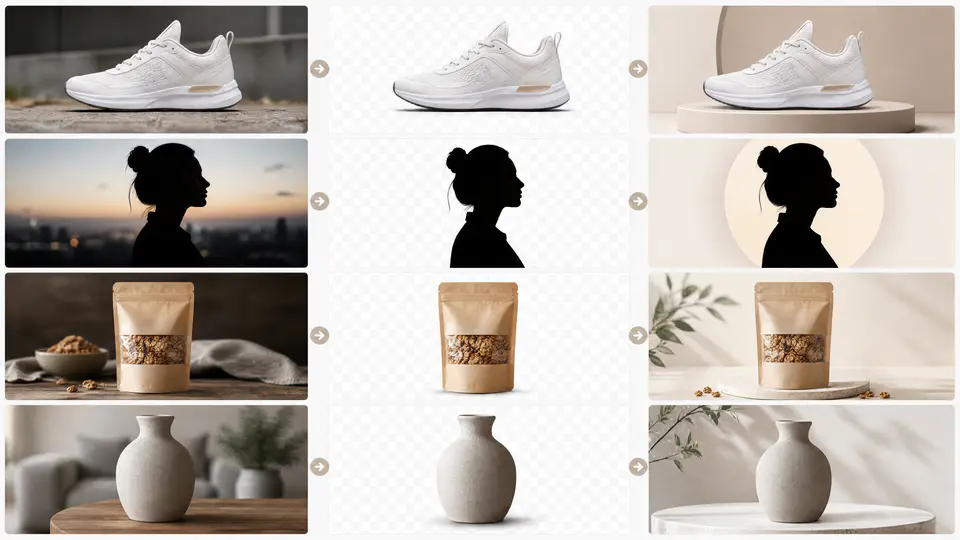
Online background removal is no longer only a designer task. Marketers, ecommerce teams, photographers, creators, recruiters, and small business owners all need clean images that can move between websites, ads, profiles, and social posts without distracting backgrounds.
The Imgkits background remover helps turn a busy photo into a reusable subject cutout. After that, you can keep the result transparent, place it on a white background, or use the background changer to create a more suitable visual setting.
Why Professionals Use Background Removal
A good photo can lose impact when the background is cluttered, off-brand, poorly lit, or inconsistent with the rest of a campaign. Removing the background makes the subject easier to reuse and easier to understand.
- Consistency: related images can share the same clean visual style.
- Flexibility: one cutout can be reused across many designs.
- Speed: teams can prepare images without manual masking for every asset.
- Focus: viewers see the product, person, or object first.
Marketers and Ecommerce Teams
Marketing images need to communicate quickly. A background remover helps teams isolate products, people, or objects and place them on cleaner layouts for ads, email headers, landing pages, product cards, and campaign thumbnails.
Common Uses
- Creating clean product listing images.
- Preparing product cutouts for banners and ads.
- Making consistent marketplace images from mixed supplier photos.
- Replacing weak backgrounds with brand colors or simpler studio-style scenes.
Photographers and Creative Studios
Photographers often need to deliver multiple versions of the same image. A background-free version can be useful for client previews, ecommerce packs, model portfolios, and design handoffs. AI removal is not a replacement for every retouching job, but it can speed up early drafts and simple cutout work.
Creators and Social Media Teams
Creators often need images that work in thumbnails, carousels, profile graphics, short-form video covers, and promotional posts. Removing the original background gives them more control over text placement, color contrast, and composition.
- Make profile images look cleaner.
- Create thumbnails with readable text space.
- Reuse the same subject across multiple social layouts.
- Separate a person or object from a distracting room or street scene.
Recruiters, Teams, and Small Businesses
Team pages, resumes, speaker bios, and profile photos often need a consistent look. If every headshot was taken in a different place, removing the background and replacing it with a simple color can make the full set look more organized.
Which Output Should Each Team Use?
| Use Case | Recommended Output | Helpful Tool |
|---|---|---|
| Marketplace product listings | White background | Background remover |
| Website banners and thumbnails | Transparent PNG | Background remover |
| Campaign visuals | New brand background | Background changer |
| Profile and team photos | Simple solid background | Background remover or changer |
How to Remove a Background Online
- Open the Imgkits background remover.
- Upload the photo you want to edit.
- Let AI detect the main subject and remove the background.
- Choose transparent, white, or another clean background style.
- Download the finished image and use it in your design, store, or profile.
Tips for Professional Results
- Start with sharp photos and avoid heavy motion blur.
- Keep the full subject visible before upload.
- Review hair, fabric, shadows, and reflective objects before publishing.
- Use the same crop and background style across related images.
- Choose a background that supports the goal instead of competing with the subject.
FAQ
Who benefits most from online background removal?
Anyone who prepares images for websites, stores, ads, profiles, presentations, or social media can benefit. It is especially useful when speed and consistency matter.
Should I use a transparent or white background?
Use transparent PNG for reusable design assets. Use a white background for clean product photos, documents, and profile images that need a simple finished look.
Can I replace the background after removing it?
Yes. Remove the original background first, then use Imgkits background changer to place the subject on a new color or scene.
Final Thoughts
Background removal is a practical workflow for many teams because it makes images more flexible. Whether you are preparing products, people, or creative assets, a clean cutout gives you a better starting point for the final design.